
Pictures
Moderators: KG Steve, Chantal, Tigger, peter, Chief Spud
-
sandersj89
- KG Moderator
- Posts: 463
- Joined: Wed Nov 30, 2005 12:29 pm
- Location: West Sussex
- Contact:
PT,
You need to first save your pictures onto the web some where. Your internet provider might give you free web space our you can use something like Photobucket:
http://photobucket.com/
Register with them and load up your images. It is best to resize the image so they are not too large as they take ages to load for those people on dial up.
When loaded you will see boxes below the picture, these contain bits of code that look like this, the first one is the plain url for the picture.
http://i6.photobucket.com/albums/y222/s ... tcorn2.jpg
To see the image on this forum as part of the post you need to enclose it in a set of url tags. The bueaty of photbucket is that the site does this for you. The third box of code includes the relevant tags. The tags are [*img*] infront of the url and [*/img*] at the end of the url. You have to remove the “*”’s for them to work.
So then by copying and pasting that code here you get:
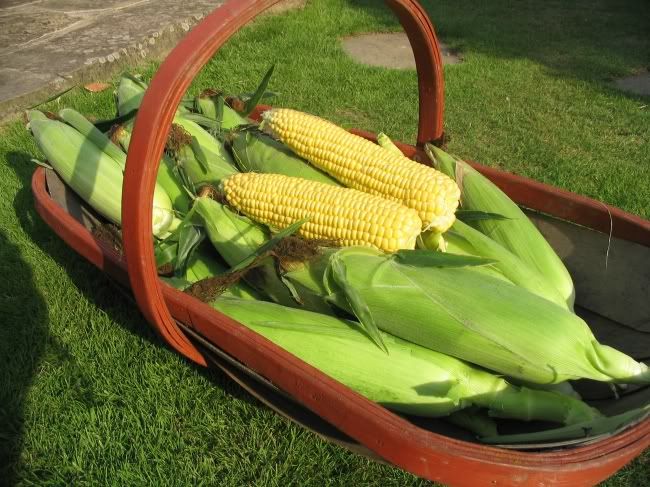
Any problems give me a shout.
Jerry
You need to first save your pictures onto the web some where. Your internet provider might give you free web space our you can use something like Photobucket:
http://photobucket.com/
Register with them and load up your images. It is best to resize the image so they are not too large as they take ages to load for those people on dial up.
When loaded you will see boxes below the picture, these contain bits of code that look like this, the first one is the plain url for the picture.
http://i6.photobucket.com/albums/y222/s ... tcorn2.jpg
To see the image on this forum as part of the post you need to enclose it in a set of url tags. The bueaty of photbucket is that the site does this for you. The third box of code includes the relevant tags. The tags are [*img*] infront of the url and [*/img*] at the end of the url. You have to remove the “*”’s for them to work.
So then by copying and pasting that code here you get:
Any problems give me a shout.
Jerry
Farmers son looking to get back to the land full time one day.....
Holiday in Devon? Come stay with us: http://www.crablakefarm.co.uk/
Holiday in Devon? Come stay with us: http://www.crablakefarm.co.uk/
Morning Jerry.
Thanks for the info. I'm a bit slow at this computer lark, but having fun learning.
Got a Apple Mac, so thing don't seem to work like with Ms.[/list][/url]
Thanks for the info. I'm a bit slow at this computer lark, but having fun learning.
Got a Apple Mac, so thing don't seem to work like with Ms.[/list][/url]
"One of the healthiest ways to gamble is with a spade and a packet of garden seeds"

-
Garlic_Guy

- KG Regular
- Posts: 171
- Joined: Sat Mar 11, 2006 8:55 pm
- Location: Bristol
- Contact:
Hi PT,
Jerry's advice about where to put your pictures initially is spot on.
I initially used to type in the [Img] tags, but when you're creating a message, there's a whole series of buttons above you which you can use. In addition to making your text bold etc, you can also use one of these buttons to mark the start and end of a link to your picture. Just press the "Img" button before and after the link. For example:

This is still doing the same thing Jerry mentioned - you may just find it easier if (like me) your fingers are dyslexic.
Jerry's advice about where to put your pictures initially is spot on.
I initially used to type in the [Img] tags, but when you're creating a message, there's a whole series of buttons above you which you can use. In addition to making your text bold etc, you can also use one of these buttons to mark the start and end of a link to your picture. Just press the "Img" button before and after the link. For example:
This is still doing the same thing Jerry mentioned - you may just find it easier if (like me) your fingers are dyslexic.
-
peter

- KG Regular
- Posts: 5879
- Joined: Fri Nov 25, 2005 1:54 pm
- Location: Near Stansted airport
- Has thanked: 23 times
- Been thanked: 81 times
- Contact:
Photobucket also has some more advanced bits.
Tick the box to select one of your pic's and click on the "Generate" button, that will give you a screen with a load of options to highlight, copy and paste into KG.
Tick the box to select one of your pic's and click on the "Generate" button, that will give you a screen with a load of options to highlight, copy and paste into KG.
Do not put off thanking people when they have helped you, as they may not be there to thank later.
I support http://www.hearingdogs.org.uk/
I support http://www.hearingdogs.org.uk/
As a newbie to computers is it not possible to direct images to my pictures and then send them as an attachment to the forum in the posting that you wish. Also when using bold or underline on the message board it does not do exactly what i ask it to do but gives me some sort of abbreviation . what am i doing wrong?
advice please.
Regards Brenjon
advice please.
Regards Brenjon
Yes - you can put a link to a photo. As for using the buttons (Bold, Italics, Underlined, etc) when you post a reply - it will appear as a code when you are constructing the message, but this will realise into the real thing when it appears on the Forum.
Have a few practise runs. You can alays ask the Moderators to remove them, if you wish.
Have a few practise runs. You can alays ask the Moderators to remove them, if you wish.
I got a picture on photobucket, still don't seem to be able to get a photo on the forum. I can't see these "*" in the code. I want to put a pic in my profile. HELP!
"One of the healthiest ways to gamble is with a spade and a packet of garden seeds"
-
Chantal
- KG Regular
- Posts: 5665
- Joined: Thu Nov 24, 2005 9:53 am
- Location: Rugby, Warwickshire
- Been thanked: 1 time
You don't need all that fuss to add a piccie (avatar)to your profile.
Find a photo you like and then go to http://www.shrinkpictures.com/. Browse for your picture and then select.
The size you need is a custom one of 120.
Click resize and follow the instructions. You send it to your own computer and then go to your profile. Browse and select the photo from your own computer and you've done it. Submit your profile and Bob's your uncle.
If you still don't understand; as I'n not much good at explanations, Jerry will no doubt sort you out.
Find a photo you like and then go to http://www.shrinkpictures.com/. Browse for your picture and then select.
The size you need is a custom one of 120.
Click resize and follow the instructions. You send it to your own computer and then go to your profile. Browse and select the photo from your own computer and you've done it. Submit your profile and Bob's your uncle.
If you still don't understand; as I'n not much good at explanations, Jerry will no doubt sort you out.
Chantal
I know this corner of the earth, it smiles for me...
I know this corner of the earth, it smiles for me...
Hi Chantal.
Thanks for the info on shrinking photos, it worked a treat. Still trying to get it on KG.
There's so much info to read on the forum, that getting a photo on here takes second place.
I just read you got the job of moderator on KG, back in March congratulations, hope we don't work you to hard.
PT
Thanks for the info on shrinking photos, it worked a treat. Still trying to get it on KG.
There's so much info to read on the forum, that getting a photo on here takes second place.
I just read you got the job of moderator on KG, back in March congratulations, hope we don't work you to hard.
PT
"One of the healthiest ways to gamble is with a spade and a packet of garden seeds"