Page 1 of 3
Pictures
Posted: Fri Nov 25, 2005 8:10 pm
by John
Is it possible to add a picture to a posting?
John
Posted: Fri Nov 25, 2005 8:19 pm
by John
I see that there is an Img tag in the 'Post a reply' section but how does this work please?
John
Posted: Sat Nov 26, 2005 9:00 am
by Clive.
[/img]
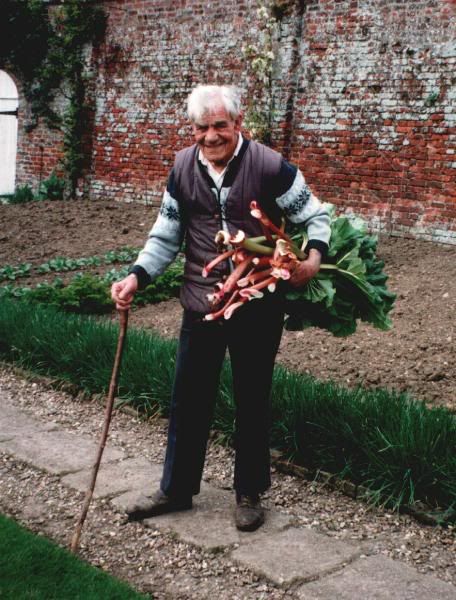
Playing with a photo.....wonder if it will post to forum..??
Clive.
It's not me...!!
Posted: Sat Nov 26, 2005 2:02 pm
by Diane
It worked. Great photo - and just look at all that potential rhubarb crumble

Posted: Sat Nov 26, 2005 3:19 pm
by Clive.
Hello,
Pleased to read that it worked all ok...I did wonder if it might only be viewable by myself..to do with a share option on the photo hosting site.!!
Good old Charlie Wilk's scrounging Rhubarb back in 1993.
All the best,
Clive.
Posted: Sat Nov 26, 2005 4:44 pm
by John
Nice photo Clive!
How did you do it?
Very, very simple instructions please!
John
Posted: Sat Nov 26, 2005 5:04 pm
by Clive.
Hello John,
I was not sure how to use the photo option..
I don't think photos can be uploaded directly to the Forum.??...but I opened a free account at
www.photobucket.com to which I can then upload photos.
Be careful of the photobucket advertising yes/no options.!!
I reduced the photos before uploading to about 640 pixels wide...using an old basic i-photo plus 4 photo adjusting program that came with my ancient scanner.
This I think keeps them to a sensible size in the forum window rather than having to scroll across a picture to view it.
I'm on a 800x600 monitor setting.
The photobucket site generates an img link which can then be copied and pasted to the reply window of the Forum...I think that is how it works...so the photo is thus linked to the Forum for viewing.
I used the Preview option of the Forum to see if it had worked before clicking submit.
What's the betting that I've done it a real long winded way..???!!!!
All the best,
Clive.
Posted: Sat Nov 26, 2005 5:14 pm
by John
Thanks a lot Clive.
I'll give it a try.
John
Great rhubarb!
Posted: Sat Nov 26, 2005 9:18 pm
by Guest
Hello Clive
I think I've got the hang of it at last so I'll just have a quick practice.
Here are a few of my garden girls on slug patrol last Spring.
Thanks for your help
John
PS I know there is a preview facility but I think it would be a great help if we also had a 'Test Forum' on here where learners like me could practice this sort of stuff.
Posted: Thu Dec 01, 2005 7:03 pm
by John
Apologies for the snowflakes!
Just playing about with this Avatar thing.
Enough of this frivolity - must get back to some serious postings
John
Posted: Wed Dec 07, 2005 9:52 pm
by Chris
Hi
I'm attempting a picture

Posted: Wed Dec 07, 2005 10:00 pm
by Chris
Chris
Got that wrong - did all the photobucket stuff and entered url after img in brackets. I'll try again - any tips?
Chris
Posted: Wed Dec 07, 2005 10:19 pm
by John
Hello Chris
The line to insert your picture should look something like this where the http:/---------- .gif will be the photobucket reference for your picture:
['img]http://www.phpbb.com/images/phplogo.gif[/'img]
Leave out the ' before the img - I put this in so that the line displays as text.
When you do a preview your picture should show up if you've got things set up right. There is some help on the Post a reply page - click on the BBCode link.
Good luck
John
Posted: Thu Dec 08, 2005 9:48 pm
by Chris
John
Thanks for the advice - I'll try again.
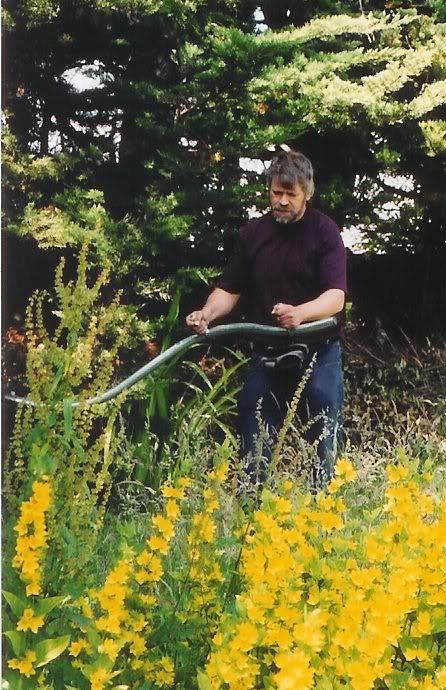
Seems to have worked - thanks.
Posted: Fri Dec 09, 2005 8:23 pm
by Chris
Hi
I know it's not usually sensible to reply to your own posts - but is there any way of posting smaller photos?