Page 2 of 2

Re: Sucessional Peas

Posted: Thu Jun 20, 2013 8:39 pm
by Arnie
Hi Johnboy,

You are not alone in needing an idiots guide for photo's, my lads are fed up trying to show how to do it :lol: I just cant get the hang of it no matter how I try :oops: :shock:

Regards


Arnie :wink:

Re: Sucessional Peas

Posted: Thu Jun 20, 2013 11:04 pm
by Geoff
I don't know a simple way of getting photos to the correct size to display properly, I use Photoshop that I realise not everybody will have. If somebody can post that bit so you can get your photos to 640 x 'anything you like' pixels, the rest is easy.
Click 'Choose File' button and find the photo on your machine and double click, the filename will appear beside the button.
Click 'Add the file' button and I little window will open showing it is transferring the file.
That is basically all you have to do, if you click 'Preview' you will see the photo is included in your post.
If you want to have control over positioning amongst your text, get the cursor to where you want it then click 'Place inline' and the filename will appear with 'attachment' each side of it.
Seeing we are on Peas, here is a photo of Mangetout Delikett that I mentioned in my tunnel post. These are growing outside and show how uniform and productive they are, you can't see the great texture and flavour!
IMG_2923_M.jpg
IMG_2923_M.jpg (229.41 KiB) Viewed 3652 times

Re: Sucessional Peas

Posted: Fri Jun 21, 2013 6:41 am
by Johnboy
Hi Geoff,
My problem with trying to add a photo is getting them down to size.
The slot will only allow 1mb and I have a folder with ten photos which at present is 41mbs.
I thought of thumbnails but this is not an option open to me even using individual photos for some unknown reason.
My SIL is not available to advise me at present so I called on a friend who regularly puts photos on Facebook and we spent over an hour trying and in the end we had to call it a day.
I can condense the folder to 6% to Email but then it asks questions using abbreviations I know nothing about so that is not an option.
Over the last couple of years I have tried and tried but sadly it defeats me every time.
I think I should sign myself 'frustrated from NW Herefordshire.'
JB.

Re: Sucessional Peas

Posted: Fri Jun 21, 2013 8:35 am
by Geoff
JB - done some research - you could try this:
You can do it using Paint - which I hope is the same in all versions of Windows.
Find a photograph you want to change the size of, right click and select Open With and Paint
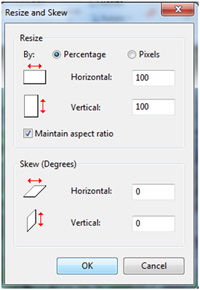
On the top toolbar you should see Resize, select it and you will get this:
Reducing1.jpg
Reducing1.jpg (43.77 KiB) Viewed 3636 times

Change the button selection to Pixels, put 640 in the Horizontal box, make sure the tick stays against 'Maintain aspect ratio' and click OK.
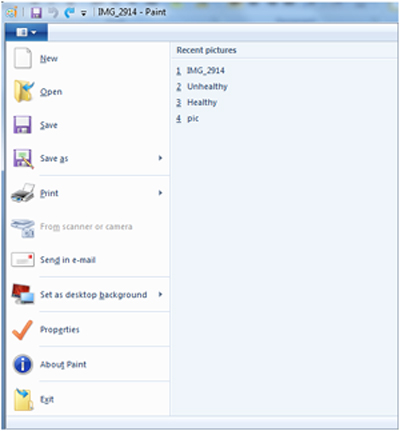
To save the file as a new name so you don't spoil the resolution of your photograph click the little button with the arrow almost top left and you'll get this:
Reducing2.jpg
Reducing2.jpg (62.25 KiB) Viewed 3636 times

Select 'Save As' then the jpeg file type and it should take you to where your file is stored and display its name. I usually just add _R to the end of the name to show I have reduced it then when I am looking for files later they come up next to each other.
Then back to my original notes, repeated here so all in one place.
When creating a new reply or posting
Click 'Choose File' button and find the photo on your machine and double click, the filename will appear beside the button.
Click 'Add the file' button and I little window will open showing it is transferring the file.
That is basically all you have to do, if you click 'Preview' you will see the photo is included in your post.
If you want to have control over positioning amongst your text, get the cursor to where you want it then click 'Place inline' and the filename will appear with 'attachment' each side of it.
Good luck!

Re: Sucessional Peas

Posted: Thu Aug 01, 2013 5:52 pm
by Ricard with an H
Both my cameras have a setting where you produce small files that are perfect for forum/internet needs and much easier than faffing with software. The problem is that all cameras are different though i'm guessing if you go for the smallest setting you'll be about right.

Re: Sucessional Peas

Posted: Thu Aug 01, 2013 7:25 pm
by Pennyroyal
For anyone still using XP, you can download this tool which resizes very quickly and easily.

http://download.cnet.com/Image-Resizer-Powertoy-for-Windows-XP/3000-18487_4-10905400.html

whilst viwing an image you right-click it and select 'resize picture' then an images size to suit your needs.